
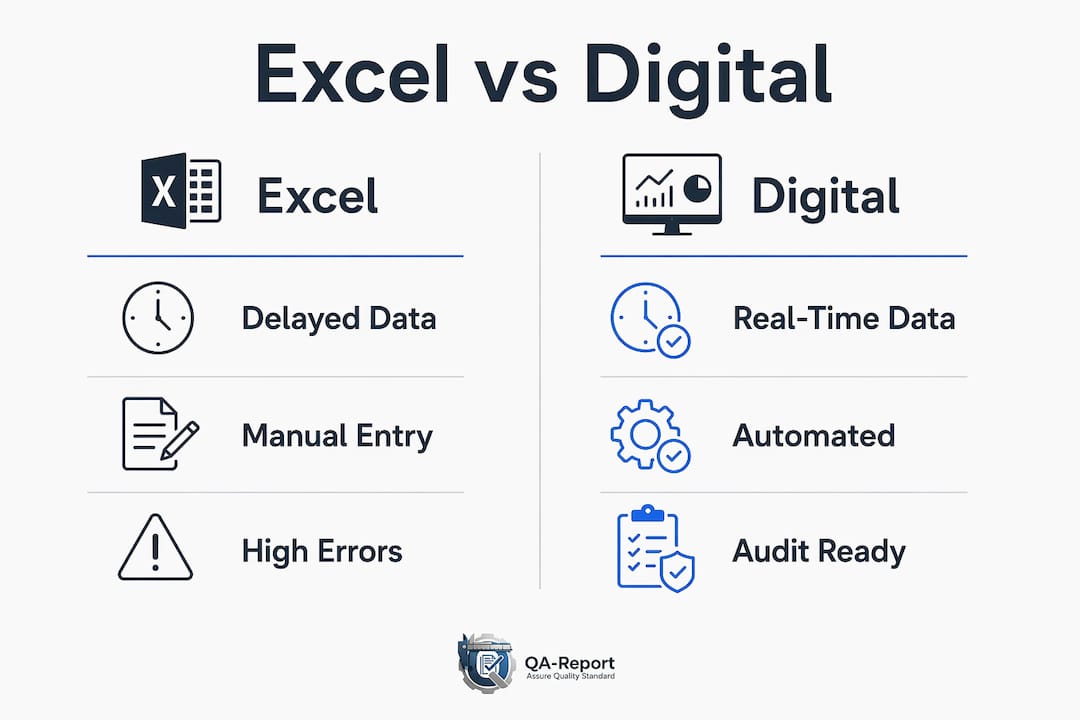
Digital inspection reports outperform Excel spreadsheets on every dimension that matters for serious inspection management: accuracy, audit readiness, real-time visibility, and compliance with standards like ISO 9001, AS9100, and PPAP. Excel remains workable only for very small, low-volume programs with minimal regulatory demands. For any operation running multiple inspectors, multiple sites, or regulated documentation requirements, the spreadsheet model creates compounding risk.
The core advantages of digital inspection platforms over Excel:
- Audit-ready documentation generated automatically, with complete user ID and timestamp logs
- Real-time data capture including GPS, photos, and timestamps attached directly to inspection records
- Automated compliance reports satisfying ISO 9001, AS9100, and PPAP with a single export
- Scalability from 1 to 1,000,000+ records without performance loss, versus Excel's sharp degradation above 1,000 rows
- Eliminated consolidation overhead, replacing 2 to 5 hours of daily manual work with live, centralized data
- Mobile offline support so inspectors capture structured data on the floor without connectivity
If your team manages more than 20 inspections per day, operates across multiple sites, or faces any regulatory audit, the case for moving beyond spreadsheets is clear.
Table of Contents
- Why Excel fails at scale for inspection management
- What digital inspection platforms actually deliver
- How do digital reports and Excel compare feature by feature?
- Moving from Excel to digital inspection tools: what to expect
- How QA-Report handles what Excel cannot
- Key Takeaways
- QA-Report replaces your inspection spreadsheets with audit-ready reports
Why Excel fails at scale for inspection management
Excel's familiarity is exactly what makes it dangerous. Teams adopt it because setup is fast and everyone already knows it. But that ease masks serious structural weaknesses as inspection complexity grows.
Over 90% of spreadsheets used in business processes contain errors, according to research from KPMG on spreadsheet risk. For inspection management, those errors translate directly into compliance gaps and decisions made on unreliable data.
The specific failure modes are predictable:
- Version control collapse: Multiple copies of the master file circulate across inspectors, with no clear record of which is current. A study by F1F9 found that 72% of spreadsheet users experienced a version control problem that affected business decisions.
- No audit trail: Excel logs no changes with user IDs or timestamps. During a regulatory inspection, you cannot prove that data is original and unmodified.
- Disconnected photo evidence: Photos live in separate folders, referenced by filename. Within months, that link breaks. During audits, inspectors routinely cannot produce the specific photos tied to inspection records.
- Data loss exposure: Spreadsheets stored on local drives or network shares have no automatic backup. A single hardware failure or accidental deletion can erase years of inspection history.
- Performance degradation: Excel handles 100 records without issue. At 10,000 records, filtering becomes slow. At 50,000, routine queries take minutes per operation.
The consolidation burden alone is telling. In any multi-inspector operation, someone spends 2 to 5 hours per day merging individual inspector files into a master spreadsheet. That work produces no operational value and introduces transcription errors at every step.
Pro Tip: If your team is spending more than 30 minutes per day reconciling inspection spreadsheets, that overhead is already costing more than a digital platform subscription.
What digital inspection platforms actually deliver

The shift from spreadsheets to purpose-built inspection software is not just about replacing a tool. It changes what your team can do with inspection data entirely.
Digital platforms provide live, real-time visibility with automated capture of GPS coordinates, timestamps, and photos. Management sees inspection progress as it happens, not hours later after manual entry. A critical defect flagged at 7 AM reaches the right person immediately, not the following morning.
The operational benefits stack up across every part of the workflow:
- Structured data capture: Smart forms with required fields and conditional logic prevent incomplete submissions at the point of inspection, not during cleanup afterward.
- Evidence integrity: Photos attach directly to inspection items, GPS-tagged and timestamped, automatically included in every report. The link between evidence and record never breaks.
- Automated scheduling: Digital inspection tools automate scheduling with timely alerts to prevent missed inspections, a function Excel cannot replicate.
- One-click compliance reports: Audit-ready documentation is generated on demand, not assembled manually over hours.
- Offline capability: Inspectors capture structured data on the shop floor or in the field without connectivity, syncing automatically when back online.
Practitioners consistently note the shift from manual data entry to active analysis that digital platforms enable. Your team stops spending time on data housekeeping and starts spending it on quality decisions.
| Capability | Excel | Digital inspection platform |
|---|---|---|
| Data availability | Hours or days after inspection | Live, real-time |
| Photo evidence | Stored separately, manually matched | Attached to record, GPS-tagged |
| Audit trail | None | Full log with user ID and timestamp |
| Compliance reports | Hours of manual preparation | Generated on demand |
| Data backup | Manual, local or network | Automatic cloud backup |
| Record scalability | Degrades above 1,000 rows | 1 to 1,000,000 records without degradation |
How do digital reports and Excel compare feature by feature?
The differences between spreadsheet-based inspection management and dedicated digital platforms become concrete when you evaluate them against the criteria that actually matter in regulated manufacturing environments.

| Evaluation area | Excel | Digital inspection platform |
|---|---|---|
| Accuracy and error rates | High manual entry error risk; over 90% of spreadsheets contain errors | Structured fields and validation rules prevent errors at entry |
| Data security | Local or network storage, no encryption, no access controls | Cloud storage with encryption, role-based permissions, disaster recovery |
| Audit readiness | No tamper-proof log; cannot verify inspection provenance | Complete change log with user ID and timestamp; defensible in any audit |
| Real-time collaboration | Single-user editing; simultaneous access causes corruption | Multi-user, multi-site access with live sync |
| Offline and mobile support | No native mobile app; requires connectivity for cloud versions | Purpose-built mobile apps with offline inspection support |
| Compliance support | No built-in standards alignment | Configurable for ISO 9001, AS9100, PPAP, and other frameworks |
| Automation | None; all scheduling, reminders, and reports are manual | Automated scheduling, alerts, report generation, and workflow triggers |
Excel cannot satisfy auditor demands for verification of inspection provenance. Without tamper-proof logs, it is structurally unsuitable for regulated environments regardless of how carefully your team manages the files.
Moving from Excel to digital inspection tools: what to expect
Resistance to switching from Excel is normal, and it usually disappears faster than teams expect. Most users adapt and see productivity gains within 2 to 3 weeks of actual use. The fear is about disrupting established workflows; the reality is that digital tools make the inspector's job faster and simpler.
The practical migration challenges worth planning for:
- Historical data migration: Import existing spreadsheet records as baseline data in the new system. Future inspections build on that foundation, and trending analysis can use both historical and new data together.
- Parallel operation period: Run both systems simultaneously for 2 to 3 weeks. This builds team confidence without creating a hard cutover risk.
- Training scope: Focus initial training on the inspection capture workflow, not the full platform. Inspectors need to complete their first digital inspection successfully on day one.
- Change management: Involve inspectors early. Teams that participate in form design and workflow setup adopt the new system faster than those who receive a finished tool with no input.
The digital transition is not just a tool swap. It is an organizational standardization that reduces audit stress and operational overhead across every team that touches inspection data. The compliance automation benefits alone typically justify the switch within the first quarter.
Pro Tip: Designate one internal champion per shift during the parallel operation period. That person answers peer questions in real time and dramatically accelerates adoption without requiring formal training sessions.
How QA-Report handles what Excel cannot
QA-Report is a cloud-based quality inspection and production management platform built specifically for manufacturers in aerospace, automotive, and medical device production. It addresses the exact gaps that make Excel unsuitable for serious inspection programs.
The platform's core inspection capabilities include:
- AI-driven drawing ballooning that auto-numbers dimensions on PDF drawings, linking each balloon directly to measured results in the inspection record
- CMM data import with automated report generation, eliminating manual transcription from coordinate measuring machines entirely
- GD&T support with tolerance validation and automatic out-of-tolerance flagging
- FAI report generation satisfying AS9100 and AS9102 requirements, produced in minutes rather than hours
- Role-based permissions with mobile access for inspectors on the shop floor, and a built-in 3D CAD viewer supporting STEP and IGES files
QA-Report satisfies ISO 9001, AS9100, and PPAP compliance requirements with audit-ready PDF reports generated on demand. Every measurement, every deviation, and every approval is logged with full traceability.
QA-Report's measurement wizard links ballooned drawing dimensions to measured results, auto-flags out-of-tolerance deviations, and generates statistical summaries and professional PDF reports that satisfy ISO 9001, AS9100, and PPAP requirements. Automatic drawing ballooning, CMM data import, and tolerance validation remove hours of manual work that spreadsheet-based programs cannot eliminate.
Beyond inspection reporting, an integrated MES layer manages production across parts, batches, and operations with route cards, kanban and Gantt planning, and rejection and recovery tracking. For quality engineers who need automated inspection documentation tied directly to production records, that integration removes the last manual handoff in the quality workflow.
Key Takeaways
Digital inspection platforms eliminate the accuracy, compliance, and scalability failures that make Excel unsuitable for any regulated or multi-inspector inspection program.
| Point | Details |
|---|---|
| Excel's error rate | Over 90% of spreadsheets contain errors, creating direct compliance and data integrity risk. |
| Daily time savings | Digital platforms eliminate 2 to 5 hours of daily manual consolidation work. |
| Scalability gap | Excel degrades above 1,000 records; digital platforms handle 1 to 1,000,000+ without performance loss. |
| Adoption timeline | Resistance to digital tools typically dissolves within 2 to 3 weeks as users experience efficiency gains. |
| QA-Report fit | QA-Report generates audit-ready FAI, GD&T, and CMM reports satisfying ISO 9001, AS9100, and PPAP requirements. |
QA-Report replaces your inspection spreadsheets with audit-ready reports
Quality engineers managing FAI, dimensional, or GD&T inspections in aerospace, automotive, or medical device production lose hours every week to manual Excel work that a purpose-built platform eliminates entirely. QA-Report is that platform.

Where Excel requires manual ballooning, manual CMM transcription, and manual report assembly, QA-Report automates all three. AI-driven drawing ballooning links dimensions to measurements automatically. CMM data imports and maps without manual entry. Compliance reports for ISO 9001, AS9100, and PPAP are generated on demand, not built from scratch before every audit.
The platform runs in the cloud with mobile access for floor inspectors, role-based permissions for multi-location teams, and a built-in 3D CAD viewer. There is no spreadsheet to maintain, no version to reconcile, and no audit trail to reconstruct after the fact.
Start a free trial at qa-report.com and generate your first audit-ready inspection report today.