
The fastest way to share inspection reports securely is through an encrypted, time-bound link with password protection, revocation capability, and audit logging. That combination gives you control over who accesses the report, for how long, and leaves a traceable record for your quality management system.
Three controls make this approach work:
- Encryption in transit and at rest: TLS during transfer, encrypted storage at rest, so the data is protected end-to-end.
- Time-bound access with revocation: Best-practice expiry for most documents is 1–7 days depending on project needs; revocation cuts off access immediately if circumstances change.
- Audit logging: A timestamped record of who viewed, downloaded, or attempted access supports ISO 9001, AS9100, and PPAP document control requirements.
Platforms like QA-Report issue unique, configurable links that carry inspection results, ballooned drawings, and certificates in a single interactive view, with expiration and revoke controls built in.
Table of Contents
- Why does email fail for sharing inspection reports securely?
- What security features should every sharing solution provide?
- Which sharing methods actually work for inspection data?
- How do you implement secure sharing in a QA workflow?
- What should a securely shared inspection package contain?
- How does secure sharing support ISO 9001, AS9100, and PPAP compliance?
- How does QA-Report handle secure, traceable report sharing?
- Quick checklist: configure a secure share in under 10 minutes
- Key Takeaways
- The part most QA teams underestimate
- QA-Report makes secure sharing part of your inspection workflow
- Useful sources and further reading
Why does email fail for sharing inspection reports securely?
Standard email attachments propagate copies across servers, inboxes, and forwarded threads. Once sent, you cannot revoke them. A customer who receives a PDF on Monday and forwards it to a supplier on Wednesday now holds a copy you have no visibility into, and no mechanism to recall.
Open "anyone with the link" cloud shares compound the problem. Without expiration, a link shared during a first article inspection review can still be active months later, long after a revision has superseded the original report. Recipients who save PDFs locally and work from those files introduce version-control gaps that are difficult to close and nearly impossible to audit.
The practical result: your QMS shows one current revision, but three stakeholders are working from three different PDF versions with no traceability connecting any of them.
What security features should every sharing solution provide?
Secure sharing is as much about lifecycle controls as it is about encryption. A solution that encrypts in transit but never expires a link has only solved half the problem.
- TLS encryption in transit and encryption at rest with clear key-management practices.
- Time-bound, revocable links with configurable expiration and per-link download limits.
- Password protection with out-of-band delivery: per NIST SP 800-63B, send the password via SMS, phone, or encrypted messenger, never in the same email as the link.
- Audit logs recording who accessed what, when, and from which IP or user agent; exportable for auditor review.
- Version control so recipients always reach the current revision, not a cached copy.
- Role-based access controls limiting who can view, download, or re-share a report.
Pro Tip: Enable download limits alongside expiration. A link that expires in seven days but allows unlimited downloads before that can still produce untracked local copies. Set both controls together.
Which sharing methods actually work for inspection data?
| Method | Best For | Key Strengths | Limitations |
|---|---|---|---|
| Encrypted link-based portal | Interactive FAI/dimensional reports, external clients | Revocable, auditable, no inbox copies | Requires platform subscription |
| Encrypted file-transfer service | One-off large bundles, CMM data exports | Expiry, download limits, notifications | No interactive viewing; static files only |
| SFTP/FTPS | Recurring supplier or ERP integrations | Strong authentication, automated transfers | Heavy setup for casual external stakeholders |
| Encrypted email / S/MIME | Internal handoffs, low-sensitivity documents | Widely supported | No revocation; lifecycle controls are weak |
| Password-protected PDF | Fallback for recipients with no portal access | Simple, no platform needed | Password forwarding risk; no audit trail |

For most external deliveries to customers or auditors, an encrypted link-based portal is the right choice. SFTP fits recurring supplier exchanges where both sides have the infrastructure. Password-protected PDFs are a viable fallback but should not be your primary method for anything requiring traceability.
How do you implement secure sharing in a QA workflow?
-
Classify sensitivity and choose the method. Determine whether the report contains proprietary geometry, customer-specific tolerances, or controlled material certifications. That classification drives the method: portal link for external clients, SFTP for integrated supplier exchanges, encrypted email for low-sensitivity internal handoffs.
-
Prepare the package. Assemble the final dimensional report, ballooned drawing at the correct revision, FAI/AS9102 outputs where applicable, certificates of conformity, and CMM data exports (CSV or MTX). Include a version history entry.
-
Configure access controls. Set expiration to 1–7 days for most external shares, along with download limits and password protection. Deliver the password out-of-band via a separate channel.
-
Test with a pilot stakeholder. Confirm the recipient can open the report, view all components, and that the audit log records the access event with timestamp and user agent.
-
Document in SOPs and train staff. Write the expiration defaults, password delivery channel, and audit-log review cadence into your standard operating procedures. Train both internal team members and recurring external stakeholders on the protocol.
What should a securely shared inspection package contain?
Required items in every shared package:
- Final dimensional inspection report with revision identifier
- Ballooned drawing at the matching revision level
- FAI/AS9102 outputs where the contract or customer requires them
- Certificate of conformity and any material or process certifications
- CMM measurement data exports (CSV or MTX format) for automated inspection documentation
Supporting items to include as needed: annotated inspection photos, non-conformance reports (redacted to remove unrelated proprietary data), corrective action references, and a version changelog.
For file formats, use PDF/A or password-protected PDFs for human-readable documents. CMM exports travel well as CSV or MTX. Where geometry review is needed, an embedded 3D viewer link or STEP/IGES file is preferable to a flat screenshot.
How does secure sharing support ISO 9001, AS9100, and PPAP compliance?
Audit logs with IP addresses, user agents, and timestamps are strong evidence for auditors and can be exported as part of FAI or PPAP records. That detail matters when an auditor asks who received revision B of a dimensional report and when.
Key compliance mapping:
- ISO 9001 / AS9100 document control clauses require that current versions are available at point of use and that obsolete versions are prevented from unintended use. Time-bound links with version control satisfy both requirements.
- FAI / AS9102 and PPAP packages require complete records, unambiguous versioning, and traceable access history. Exportable audit logs close that loop.
- Retention: Keep original reports, access logs, and change histories for the retention period your QMS specifies. Many aerospace contracts require a minimum of ten years.
For teams managing traceability requirements across multiple parts and batches, centralizing shares in a single platform prevents the audit gaps that arise when logs are scattered across individual email threads.
How does QA-Report handle secure, traceable report sharing?
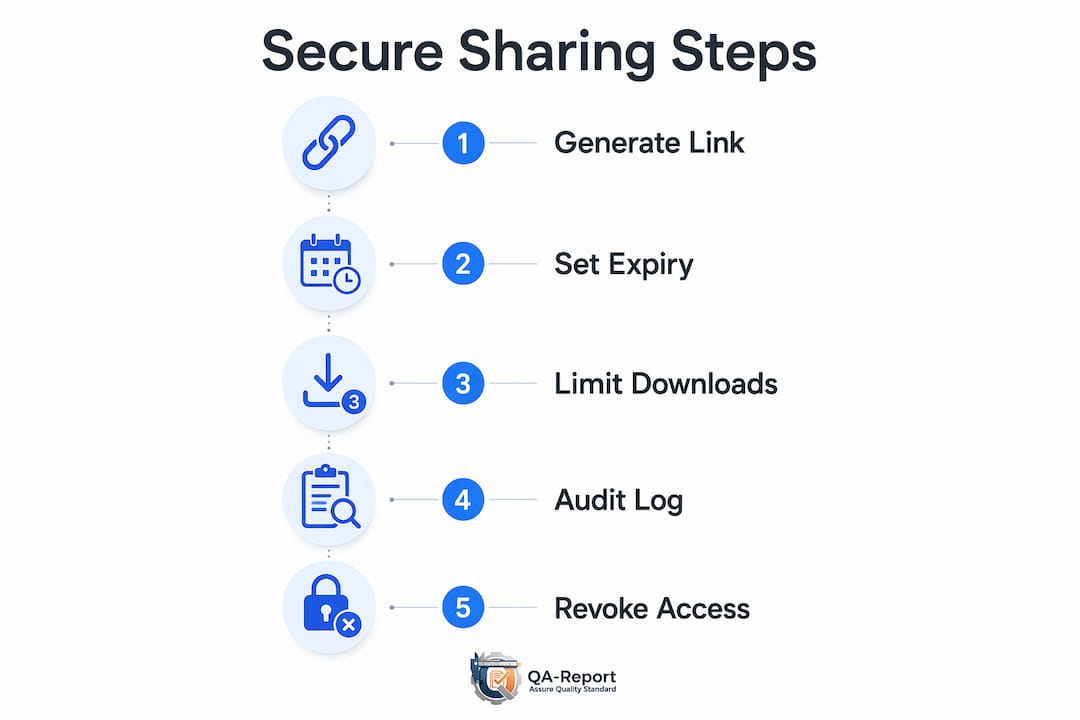
QA-Report generates unique, configurable links for each inspection report. You set the expiration window, download limits, and password requirements before sending. The recipient opens an interactive view that includes the dimensional results, ballooned drawing, certificate, and CMM data in one place, with no static PDF to save locally and forward.
A practical example: share a completed dimensional inspection report with a 7-day expiry and a one-download limit. The recipient opens the link, reviews the ballooned drawing against measured results, and the system logs the access event with timestamp. If the customer requests a revision, you revoke the original link and issue a new one tied to the updated report. The audit trail shows both events clearly.
That workflow satisfies the document control and traceability requirements of ISO 9001 and AS9100 without requiring the recipient to have a platform account.
Quick checklist: configure a secure share in under 10 minutes
- Confirm the report package is at the correct revision and all supporting documents are attached.
- Select the sharing method (portal link for external; SFTP for integrated partners).
- Set expiration to 1–7 days and configure download or view limits.
- Enable password protection; send the password via SMS or phone call, not email.
- Enable audit logging and verify the configuration before sending.
- Send the link, confirm receipt, and check that the audit log records the access event.
- Record the share in the project file; archive the original report securely once delivery is confirmed.
Key Takeaways
Secure inspection report sharing requires encrypted, time-bound links with revocation, audit logging, and out-of-band password delivery to satisfy traceability requirements under ISO 9001, AS9100, and PPAP.
| Point | Details |
|---|---|
| Use time-bound links | Set expiration to 1–7 days with download limits to prevent untracked local copies. |
| Send passwords out-of-band | Deliver passwords via SMS or phone, never in the same email as the link, per NIST SP 800-63B. |
| Require audit logs | Logs with IP, user agent, and timestamps serve as exportable evidence for FAI and PPAP audits. |
| Build sharing into SOPs | Document expiration defaults, password delivery channels, and log review cadence in written procedures. |
| QA-Report example | QA-Report issues unique, configurable links with expiration, revocation, and audit logging for FAI and dimensional reports. |
The part most QA teams underestimate
The security controls get most of the attention, and rightly so. But the bigger failure mode in most shops is not a breach — it is drift. A team sets up a secure sharing workflow, trains staff once, and then six months later half the team is back to emailing PDFs because the portal "took too long" or someone forgot the password delivery step.
Small SOP changes prevent most of that: a default expiration baked into every new share, a one-line reminder in the share confirmation template about out-of-band password delivery, and a quarterly review of active links to revoke anything that should have expired. None of those steps takes more than a few minutes, but together they close the gap between a policy that exists on paper and a practice that actually holds under audit pressure.
If a shared report is ever exposed, the response is straightforward: revoke the link immediately, identify what was accessed from the audit log, notify affected parties per your incident response procedure, and issue a new link with tighter controls. The audit log is what makes that response credible rather than speculative.
QA-Report makes secure sharing part of your inspection workflow
Sharing a complete FAI or dimensional inspection package does not have to mean assembling a folder of attachments and hoping the right version reaches the right person. QA-Report builds secure sharing directly into the inspection workflow: generate a unique link, set the expiration and download limits, and deliver a single interactive view that includes results, ballooned drawings, certificates, and CMM data with a full audit trail.

For teams working to manufacturing quality control standards in aerospace, automotive, or medical device production, that combination of traceability and access control is what turns a report delivery into a defensible quality record. Start a free trial or watch a product demo at qa-report.com to see the secure sharing workflow in action.
Useful sources and further reading
- NIST SP 800-63B: Digital Identity Guidelines — authoritative guidance on password handling, out-of-band delivery, and authentication.
- CISA: Secure Information Handling — federal guidance on document lifecycle security and risk reduction.
- What Is the Safest Way to Send Sensitive Documents Online? (EveryTransfer) — practical guide covering expiry, password protection, and download limits.
- How to Send Documents Securely (Granite) — covers authenticated portals and audit trail centralization for regulated industries.
- QA-Report Video Gallery — tutorials and demos showing secure sharing workflows, interactive report viewing, and FAI package delivery.
- Quality standards in glass manufacturing (Precision Glass) — useful reference for precision manufacturers aligning sharing practices with industry quality standards.