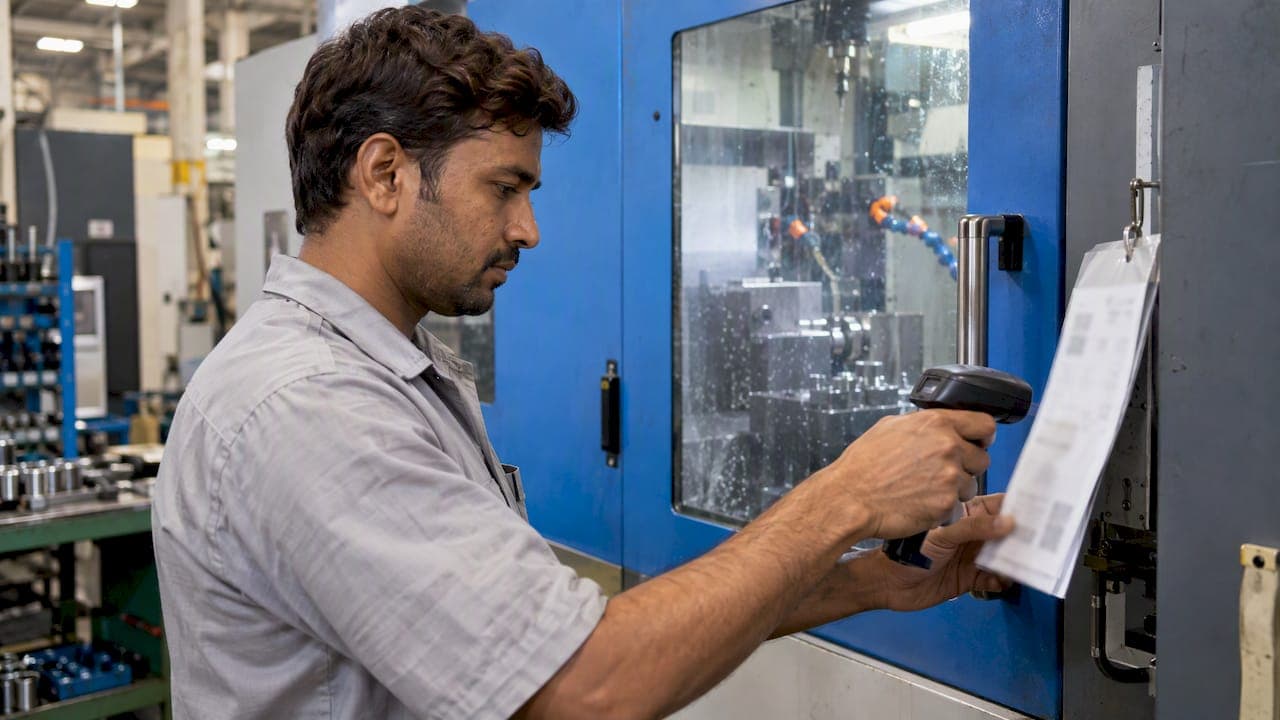
Shop floor data entry is how the facts of production get from the machine and the operator into a system your planners and quality team can trust: what was made, by whom, on which machine, how long it took, and whether it passed. The fastest way to make it accurate is to type less. Scan identifiers instead of keying them, validate every value at the moment it is entered, and collect only the fields that feed a real decision.
TL;DR
- Shop floor data entry (also called data capture or data collection) records counts, time, downtime reasons, material and quality results as work happens.
- Accuracy comes from barcode scanning, entry validation, short screens, and a record of who entered what and when.
- For every field an operator fills in, name the decision it feeds and the person who makes it. Remove the fields that fail that test.
- Start with the parts, batches and operations you already track, then add machine data and ERP links in stages.
- A platform that ties route cards, batches and inspection results together removes the double entry that causes most errors.
Table of Contents
- What shop floor data entry actually covers
- Why accuracy at the point of entry matters
- Four ways to capture shop floor data
- Comparing the methods
- How to make entry faster and more accurate
- Put real-time data to work
- Connecting entry to your other systems
- A practical rollout plan
- Our perspective
- Bring entry, tracking and inspection into one place
- FAQ
- Sources
What shop floor data entry actually covers
The term describes any point where production information is recorded at or near the work: an operator scanning a route card, a machinist logging scrap, an inspector entering a measured value, a machine reporting a cycle count. "Data capture" and "data collection" are used interchangeably with data entry, though entry usually points to the human step and capture to the whole pipeline, including automatic sources.
A 2026 MES guide from MFGTechHub lists the data types a plant may collect: counts, machine states, downtime reasons, cycle and process data, material genealogy, quality, labor, and events. Those values come from PLCs, machine interfaces, scans, operator entries, gauges, vision systems and labs. In other words, entry by hand is only one input among several, and the best systems use it only where nothing else can supply the value.
For a machine shop or a regulated manufacturer, the practical categories look like this:
| Category | Typical fields | Usual source |
|---|---|---|
| Production | Good count, scrap count, operation start and stop, order and part number | Scan plus operator confirmation, or machine counter |
| Labor | Operator, operation, time on job | Badge or login at the workstation |
| Machine | Running, idle, down, cycle time | Machine interface or PLC |
| Downtime | Reason code, duration | Operator selection from a short list |
| Material | Lot, heat or batch number, quantity consumed | Barcode scan |
| Quality | Measured dimensions, pass or fail, nonconformance reason | Gauge, CMM, inspector entry |
Why accuracy at the point of entry matters
A wrong number entered at the machine does not stay at the machine. It flows into schedules, costing, inventory and, in regulated work, the records an auditor will ask for. Think of traceability as a chain: a single bad lot number or a missing operation record breaks a link, and everything downstream of it loses its proof.
The problem is rarely carelessness. It is usually design: long forms, free-text fields, the same value typed twice into two systems, and entry done at the end of the shift from memory. Fixing those is a process job before it is a software job.
If your parts are serialized or batched for compliance, our guide to batch traceability for manufacturers shows what records need to exist and why the entry step is where they are won or lost.

Four ways to capture shop floor data
Manual entry
Paper travelers, clipboards and spreadsheets are still common. They need no investment and fit any process, but every value is typed at least twice (on the paper, then into a system), and transcription happens later, when memory and legibility have faded. Manual entry works as a starting point or a fallback, not as the long-term method for high-volume or regulated work.
Barcode and scan-based entry
Brady's explanation of automated data entry describes it as using machine-readable outputs such as barcodes, together with collection tools such as scanners, to capture and input data, which reduces errors and improves speed, reliability and reproducibility. On the floor this means the operator scans the job, the part, the lot and their own badge instead of typing them.
This is the highest-return step for most shops. Identifiers are the fields most often mistyped and the ones every other record depends on.
Connected machines
CNC controls, PLCs and measuring machines can send counts, states and results directly. The NIST guidance on collecting and reusing manufacturing data describes MTConnect as an open-source, read-only data-exchange standard with information models for devices, streams, assets and interfaces, which lets different systems interpret machine data the same way. Machine data removes keying entirely for the values it covers, though it cannot tell you why a machine stopped unless an operator adds the reason.
For measurement results specifically, importing CMM output avoids retyping dimensions into a report. See how that works in practice on our CMM inspection software page.
MES-based capture
A manufacturing execution system sits between the floor and the office. Its advantage is that it does not simply collect values, it checks them: it can confirm the operator is working on the right operation, the material is the right lot, and the value falls in range before it is accepted. The result is data that arrives clean, with the context needed to use it.
Comparing the methods
| Method | Error risk | Speed for operator | Setup effort | Best for |
|---|---|---|---|---|
| Paper and spreadsheet | High, with double entry | Slow | Minimal | Pilot or backup |
| Barcode scanning | Low for identifiers | Fast | Low to moderate | Jobs, lots, badges, locations |
| Machine connection | Very low for counts and states | Automatic | Moderate to high | High-volume or unattended machines |
| MES with validation | Low across all fields | Fast | Moderate | Regulated or multi-operation production |
Most shops end up with a blend: scans for identity, machine feeds where they are practical, and short operator entries for the things only a person knows, such as why a job was scrapped.
How to make entry faster and more accurate
MFGTechHub's recommendations for faster, more accurate entry cover four practices: point-of-work terminals with barcode scanners, validation of materials, lots, operator qualifications and values, short screens, and an audit trail of who entered data and when. Here is how to apply each.
- Put the terminal where the work is. A tablet or terminal at the machine, or a mobile device the operator carries, beats a shared office PC. Walking away from the job to log it guarantees late, rounded entries.
- Scan before you type. Anything with a label should be scanned: job, part, lot, tool, location, badge.
- Validate on entry. Reject a lot that does not belong to the order. Reject a quantity that exceeds what was released. Reject a value outside the plausible range. The operator fixes the problem while the part is still in front of them.
- Keep screens short. One task per screen, large targets, pick-lists in place of free text. If a form needs scrolling, split it.
- Record who and when. A time-stamped record of the person behind each entry makes corrections possible and supports your audit position.
Ask what each field is for
Ubisar's workflow guidance offers a simple filter: for every field operators fill in, identify the decision it feeds and the person who makes that decision. If you cannot name both, the field is a candidate for removal. Shortening a form this way usually improves accuracy more than any piece of hardware, because operators stop treating entry as paperwork and start trusting that the data gets used.
Downtime and scrap reasons
Free-text reasons cannot be summed or ranked. Build a reason list of ten to fifteen codes, review it quarterly with the operators who use it, and keep an "other" option that requires a note so the list can improve. Rejection and recovery tracking, meaning what was scrapped, what was reworked and what was recovered, works the same way: coded reasons turn a pile of notes into a Pareto chart.
Put real-time data to work
Capturing data is only useful if someone acts on it. Accurate entry at the point of work lets you:
- See order status without walking the floor, so planners can reschedule around a late operation instead of discovering it at shipping.
- Spot recurring downtime reasons and attack the largest first.
- Catch quality drift while the batch is still in process, because inspection results and production counts sit in the same record.
- Cost jobs from actual time and material rather than estimates.
The NIST Manufacturers' Guide to Industry 4.0 Technologies describes system integration as providing a centralized location for data, which enables comparison and analysis and improves visibility into planning, scheduling and performance. That is the payoff: one version of the facts, available to everyone who needs it.
To see how captured data becomes management output, read our guide to production reporting software, and for the tracking side, our production tracking software guide.
Connecting entry to your other systems
Data entered once and used everywhere is the goal. Duplicate entry between the floor, the ERP and the quality system is where discrepancies breed.
NIST's guidance recommends that manufacturers work through a sequence of steps: define the use case, identify supported devices and available data, evaluate network infrastructure, execute the integration activities, develop a data management plan, and use open standards for interoperability. It is a sound order for a machine shop of any size. Start with the use case (for example, "know the real status of every open job by noon"), and let it decide which data you need.
Three principles keep the integration healthy:
- Context makes a count meaningful. MFGTechHub notes that a raw count becomes useful only when tied to equipment, order and operation, material, time and people, which is why consistent master data across MES, ERP and other systems is essential. Clean part numbers, operation names and work center IDs come first.
- Govern the data. The National Association of Manufacturers has argued in its 2026 Manufacturing Trends report that data deserves the same rigor as physical capital: stewards, clear lineage and consistent definitions. Assign an owner to each data set.
- Decide what matters. NAM's 2024 trends report advises manufacturers to understand the value of their data and determine which data matter to the business and operations. Collecting everything is not a strategy.
Secure the connections
Once floor equipment and cloud platforms are linked, access control matters. The same 2026 NAM report warns that human error remains the leading cause of unintentional cybersecurity breaches and calls for zero-trust models. In practice: give each operator an individual login, limit each role to the screens it needs, and review access when people change jobs.
A practical rollout plan
- Pick one cell or one product line. Choose the area where bad data hurts most, such as a job type with frequent traceability questions.
- Map the current flow. Follow one job from release to shipment and mark every place data is written down or typed.
- Cut the fields. Apply the decision test and drop anything unowned.
- Label everything. Route cards, lots, bins and badges get barcodes first.
- Add validation rules for lots, quantities and operator qualifications.
- Train with the operators, not at them. They know which steps are awkward, and their fixes are usually the best ones.
- Review weekly for a month. Check rejected entries, skipped fields and late entries, then adjust the screens.
- Expand to machine data and ERP links once manual entry is stable.
Machine shops that run on route cards can see how this looks end to end in our article on MES for machine shops: route cards, batches and inventory.
Our perspective
Most data entry problems we see are workflow problems wearing a software costume. A shop gives operators a long form, asks them to retype a job number that is already printed on the traveler, and then wonders why the numbers disagree with the schedule.
We build QA-Report on the opposite premise: entry should follow the way parts actually move. A route card carries the identity, scanning replaces typing, and the same record that tracks a batch through operations also holds its inspection results. When production data and quality data live together, nobody has to reconcile two versions of the truth before an audit.
Our MES layer manages production across parts, batches and operations with route cards, kanban and Gantt planning, rejection and recovery tracking, and role-based shop-floor access. Inspectors can work from mobile devices on the floor, and measured results connect to the ballooned drawing, so out-of-tolerance values are flagged as they are recorded, not found in a review days later.
Our advice: start small, scan everything that has a label, and make every field earn its place.
Michael Chen
Bring entry, tracking and inspection into one place
QA-Report combines MES planning with route cards, batch tracking and inspection reporting, so operators enter a value once and it serves production, quality and traceability. You can start on the Free plan at $0 per month. Basic is $49.99 per month and PRO is $149.99 per month, and On-Premise and Enterprise Solutions are available with pricing on request. Compare them on our pricing page, or look at the MES software for machine shops to see how route cards and batch tracking work.

If you prefer to see it first, our video gallery walks through the workflows.
FAQ
What is the difference between shop floor data entry and data capture?
Data entry usually refers to the human step: an operator keying or selecting a value. Data capture covers the full pipeline, including scans, machine signals and gauge outputs that arrive with no typing. Most plants use both, and the goal is to shrink the manual portion to the values only a person can supply.
What data should operators record on the shop floor?
At minimum: the job and operation, good and scrap counts, time on the job, downtime reasons, and material lot numbers. Quality results are added where inspection happens at the machine. Anything beyond that should pass the test of naming the decision it feeds and who makes it.
Do I need an MES to improve shop floor data entry?
Not to begin. Barcode labels, shorter forms and coded reason lists improve accuracy on their own. An MES becomes worthwhile when you need validation across operations, batch traceability, or one record that planning and quality both rely on.
How do I keep operators from skipping or rushing entries?
Make entry quick and visible in its value. Use scans and pick-lists, keep screens short, and show operators the reports built from their data. People stop skipping fields when they see the numbers drive decisions that affect their work.
Sources
- MES Data Collection and Integration: Machine Data, Counts, and More (MFGTechHub)
- Automated Data Entry: Models, Devices and Systems (BradyID)
- How to Build Shop-Floor Data Capture Workflows Operators Use (Ubisar)
- Recommendations for Collecting, Curating, and Re-Using Manufacturing Data (NIST AMS 300-11)
- Manufacturers' Guide to Industry 4.0 Technologies (NIST MEP)
- Manufacturing Trends 2026 (National Association of Manufacturers)
- Manufacturing Trends 2024 (National Association of Manufacturers)