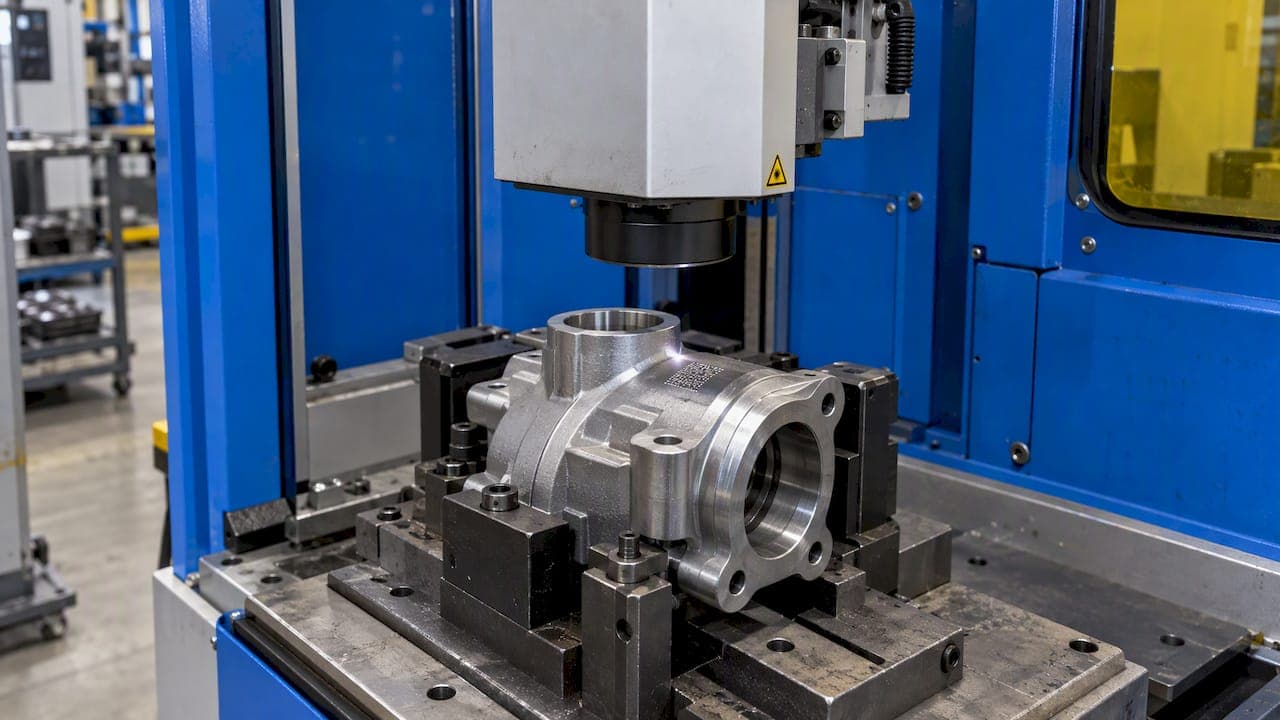
Serial number tracking means giving every individual unit a unique identifier and recording what happens to that unit from receiving through production, inspection, shipment and service. Done well, it lets you answer one question in minutes: which exact units are affected? This guide covers what to record, when to serialize, how to set it up step by step and how to choose software that holds up in an audit.
TL;DR
- A serial number identifies one unit. A lot or batch number identifies a group, and a SKU identifies a product type.
- Serialize when you must act on single units: recalls, repairs, warranty claims, regulated devices and safety-critical parts.
- Link each serial to who did the work, which part, where, when, and with what measured results.
- Plan for exceptions such as unreadable marks, missed scans, rework and scrapped serials before go-live.
- Choose software that connects serials to inspection data, not just to inventory counts.
Table of Contents
- What serial number tracking is, and how it differs from lot, batch and SKU tracking
- When to assign serial numbers
- What to link to each serial number
- How to set up serial number tracking, step by step
- Using serials to trace a defect or run a recall
- Records that support audits
- Choosing serial number tracking software
- Put serial traceability on your inspection data
- FAQ
- Sources
What serial number tracking is, and how it differs from lot, batch and SKU tracking
A serial number is a unique alphanumeric or symbolic identifier assigned to one product unit. Compliance Gate's overview of U.S. product traceability describes the contrast with a SKU: a SKU identifies product specifications such as brand, model, color or size, and its format is defined by each company rather than standardized.
The practical difference is granularity. Sellercloud explains that 1,000 units can share one SKU, one UPC and one barcode while each carries its own serial number. Shopify's comparison adds the grouping level: lot numbers identify units produced together, which is the layer between SKU and serial.
| Identifier | What it identifies | Typical question it answers |
|---|---|---|
| SKU | A product type or variation | What is this item? |
| Lot or batch number | A group made together | Which production run did it come from? |
| Serial number | One physical unit | Which exact unit is this, and what is its history? |
Lot tracking is often enough when a defect follows a process run. Serial tracking is needed when you must separate good units from bad units inside the same run. If you work with batches as well, our guide to batch traceability for manufacturers shows how the two layers fit together.
When to assign serial numbers
Serialization costs time at every step: marking, scanning, recording. So decide deliberately which products earn it. These are the situations where it usually pays off.
- Regulated products. In the U.S., FDA's unique device identifier rules define a production identifier that can include the serial number of a specific device, alongside lot number and manufacture or expiration date. Under 21 CFR 820.65, devices intended for surgical implant or to support or sustain life require traceability through a control number.
- Safety-critical assemblies. Aerospace and automotive parts where a single failed unit has consequences beyond the unit itself.
- High-value or serviced equipment. Anything with a warranty, a repair history or a calibration schedule.
- Parts that contain critical purchased components. If one supplier component fails, you need to know which finished units contain it.
- Customer contracts. Many purchase orders and quality agreements ask for unit-level records even when no regulation does.
If none of these apply and a defect would always affect a whole run, lot-level tracking is the leaner choice. Revisit the decision whenever a new customer or product line changes the requirements.
What to link to each serial number
A serial number alone is a label. The value comes from the records attached to it. A useful model comes from IPC-1782 traceability guidance, which describes five dimensions of a traceability record:
- Actor: the user or operator who performed the step.
- Subject: the unit serial number and its link to a parent assembly.
- Location: the machine, station or other resource.
- Time: a synchronized UTC timestamp.
- Context: the parameters, results and recipe or program identifier.
Translated to a machine shop or assembly floor, that gives you a concrete checklist per serial:
- Material and component lot numbers consumed, with supplier and certificate references.
- Route card operations completed, with operator, machine and timestamps.
- Inspection results: ballooned drawing dimensions, measured values, out-of-tolerance flags, CMM data and first article report references.
- Nonconformances, rework and dispositions, including any scrapped serials.
- Final inspection and acceptance records.
- Shipment details: customer, date, packing list and carrier reference.
- Service events: returns, repairs, replaced parts and warranty claims.
The first half of that list is process history. For ideas on capturing equipment, operators and process data against a serialized unit, see this piece on traceability of industrial assets. The second half is inspection evidence, which is where many serial systems are thin. Our guide to inspection documentation best practices covers how to keep that evidence consistent and audit-ready.
How to set up serial number tracking, step by step
The sequence matters. Numbering units before you have defined what the number must connect to is like numbering answers before you have written the questions: you get a tidy list that cannot be used.
1. Define the scope and the format
List the part numbers that will be serialized and why. Choose a serial format that is unique per part number or globally unique, and decide whether it carries meaning (such as a year code) or is purely sequential. Keep the rule written down, and never reuse a serial, even after scrap.
2. Decide where the number is created
Assign the serial at the earliest point where the unit is physically distinct: at kitting, at the first operation, or at marking. If the number is assigned late, earlier history has to be reconstructed from the batch, and that is where gaps appear.
3. Mark and capture
Use laser marking, labels or data plates suited to the part and its environment, and a scan or entry method inspectors can use at the station. Mobile access on the floor reduces the temptation to write records up at the end of the shift.
4. Attach production and inspection records
Each operation on the route card should record the serial, the operator and the result. Inspection results belong in the same record chain: dimensional reports, GD&T results and first article inspection documents should reference the serial or the lot it came from. Our guide to production tracking software explains how to structure this across parts, batches and operations.
5. Write procedures for exceptions
A serialization design has to account for exceptions such as unreadable marks, missed scans, rework and scrapped serials, with standard operating procedures for each, as one ERP traceability guide points out. Decide in advance who may re-mark a unit, how a replaced serial is linked to the original, and how a scrapped serial is closed so it cannot ship.

6. Close the loop at shipment, returns and service
Record the serial at shipping so you know which customer holds which unit. At returns and repair, scan the serial again and append the event to the same history. Warranty decisions then rest on the record rather than on memory.
7. Test it with a mock recall
Pick a component lot and time how long it takes to list every finished serial that contains it and where each went. If the answer takes days, the gaps are in your data links, not in your scanning.
Using serials to trace a defect or run a recall
Serial traceability turns a broad recall into a targeted one. When a defective component or safety issue is found, you can identify and contact the specific customers holding affected units, as shown in an FDA Class 2 device recall record that was scoped by unit.
Here is a worked example from a machine shop context. A supplier reports a hardness problem in one bar stock heat lot.
- Search the material lot. The system lists every work order that consumed it.
- Follow each work order to the serials produced.
- Filter by inspection results, in case some units show dimensions that suggest the issue.
- Check shipment records for the serials already delivered.
- Quarantine units still in stock and notify only the affected customers.
Without serials, step 2 stops at a batch, and you either recall everything or accept the risk. This is the broken chain problem in practice: one missing link and the history stops there.
Records that support audits
Auditors look for evidence that the record exists, is complete and matches the product. In medical devices, the FDA inspection guide says a device history record should reflect completed operations and include or refer to manufacturing dates, quantities, device identification and control numbers, labeling and acceptance records showing manufacture in line with the device master record. Our device history record guide walks through building one, and the ISO 13485 record retention guide covers how long to keep each record.
The idea of linked, tamper-evident records is broader than medical devices. A NIST project description on supply chain traceability frames a chain of Make, Assemble, Transport, Receive and Employ records. Even without blockchain, the same principle applies: each stage should reference the previous one, with changes logged rather than overwritten.
A final inspection step is where serial, inspection and shipping records meet, so a consistent final inspection checklist helps keep that handoff clean.

Choosing serial number tracking software
Most tools can store a serial number. Fewer can show what was measured on that unit. Use these criteria to compare options by type: inventory add-ons, warehouse systems, ERP modules and quality-focused platforms.
| Criterion | What to look for |
|---|---|
| Inspection linkage | Serials connect to dimensional reports, GD&T results, FAI and PPAP documents |
| Genealogy | Forward and backward trace from component lot to finished serial to customer |
| Data import | CMM and measurement data mapped to the right unit without retyping |
| Exception handling | Rework, re-marking, scrap and replacement serials with full history |
| Access control | Role-based permissions, so operators scan and engineers approve |
| Floor usability | Mobile entry for inspectors and operators |
| Reporting | Shareable PDF and interactive reports for customers and auditors |
| Deployment | Cloud, or on-premise where data confidentiality rules require it |
| Cost | Published tiers and a trial, so you can test before committing |
A warehouse-oriented tool answers where a unit is. A quality-oriented platform also answers whether it was good. If your customers are in aerospace, automotive or medical device production, the second question is the one the audit will ask.
Our perspective: serial numbers are only as good as the inspection behind them
We build QA-Report for quality engineers who are asked, usually at short notice, to prove what happened to a specific part. In our experience that proof breaks in the same place: the serial number lives in one system and the measurement evidence lives in a spreadsheet, a PDF folder or a CMM export.
That is why we put ballooned drawings, measurement validation, CMM data import, production planning and report sharing in one platform. Our approach is designed so a serial or batch links to the drawing dimension, the measured value and the out-of-tolerance flag, not just to a quantity on hand.
We also offer both cloud and on-premise deployment for organizations whose data confidentiality requirements are strict. The goal is simple: when someone asks which units are affected, your team answers from one record, in minutes.
Michael Chen
Put serial traceability on your inspection data
QA-Report connects inspection reports, CMM data and production tracking by part, batch and serial, with role-based access and mobile entry for the floor. You can start on the Free plan at $0 per month, move to Basic at $49.99 per month or PRO at $149.99 per month, and ask about On-Premise or Enterprise Solutions, which have no published price.
See the plans and pricing or look at how CMM inspection software feeds measured results into your reports. For the wider picture, our digital thread guide for quality engineers shows how design intent links to inspection and defect tracing.
FAQ
What is the difference between serial number tracking and lot tracking?
Serial tracking records the history of one individual unit. Lot tracking records a group of units made together under the same conditions. Choose serials when you need to separate affected units from unaffected ones within the same run, and lots when a problem would affect the whole run.
Which products should have serial numbers?
Regulated devices, safety-critical aerospace and automotive parts, serviced or warranted equipment, and assemblies containing critical purchased components are the usual candidates. Customer contracts can also require them. If a defect would always hit a full batch, lot tracking may be enough.
What is serial number traceability?
It is the ability to follow a single unit backward to its materials, operations and inspections, and forward to the customer and any service events. It depends on every step recording the serial. A gap at any step breaks the trace.
What should I look for in serial tracking software?
Look for links between serials and inspection results, forward and backward genealogy, CMM data import, handling of rework and scrapped serials, role-based access and mobile entry. Test it with a mock recall on real data before you commit.
Sources
- Shopify: SKU vs. serial number
- Compliance Gate: Product traceability requirements in the United States
- Sellercloud: Serial number tracking benefits
- FDA: UDI requirements for combination products
- EMS Handbook: IPC-1782 traceability levels and data
- Lot, batch and serial number tracking guide
- FDA: Class 2 device recall record
- FDA: Inspection guide on device history records
- NIST NCCoE: Manufacturing supply chain traceability project description
- MGT Italia: Traceability of industrial assets